CuePrompter alternative - InstantPrompter compared
What CuePrompter is, what this tool is, what we checked on 27 August 2026, and what we did not check. Written by the people who make one of the two.
Who wrote this
We make InstantPrompter. One of the two tools on this page is ours, so read it the way you would read any comparison written by a competitor.
What we can offer instead of neutrality is a method you can audit. Every claim about CuePrompter below was read off their live pages on 27 August 2026, and the table says which page it came from. Every claim about this tool is something you can check by opening it. Where we did not check something, we say so rather than filling in the gap.
The date matters because both tools will change, and a comparison with no date on it is one you have no way of checking.
What CuePrompter is
As of 27 August 2026, CuePrompter opens its homepage
by calling itself the number one free online teleprompter. Under that headline
sit 491 words, a feature grid and an FAQ, marked up as a WebApplication with
an FAQPage. Its sitemap lists seven URLs. Four of them are setup pages, for
YouTube, Zoom, podcasts and presentations. One is a Dutch homepage at /nl/.
That is a small site. It is a tool that does one job, with enough pages around it to answer the questions people ask most, and it has been answering them for longer than this one has existed.
We did not make an account, time a take, or work through their settings one at a time. Our check was structural: what the pages say, how they are marked up, and what is in the sitemap. So we are not going to tell you how their scroll feels at 140 words per minute. Open it and find out. That costs you two minutes and nothing else, which is the useful thing about comparing two free web tools.
What this one is
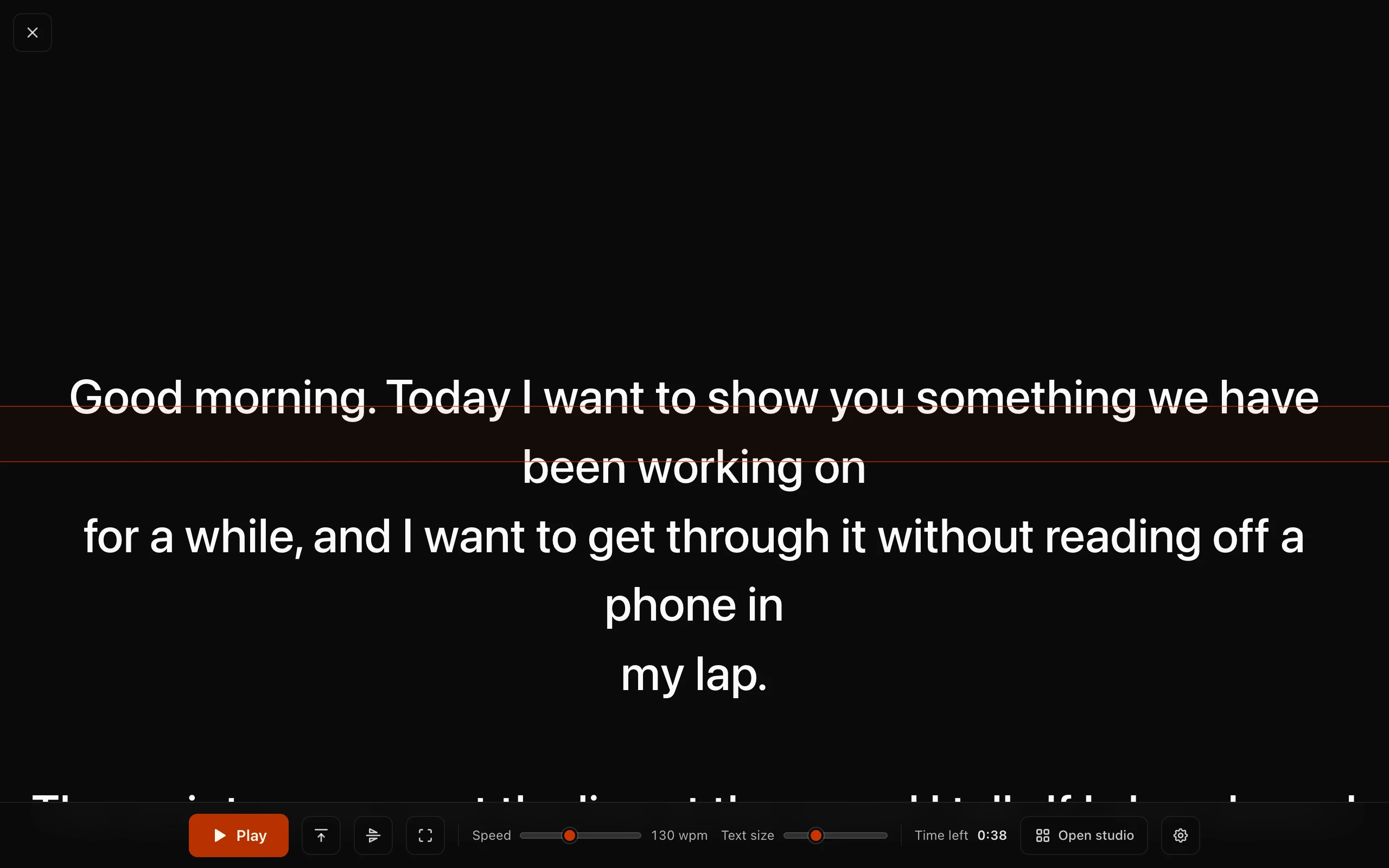
InstantPrompter is a teleprompter in a browser tab. The script scrolls past a fixed reading line near eye height, the controls sit in a dock along the bottom of the stage, and there is no install and no account.
It is built around the first thirty seconds. When the page loads there is already a sample script in the box and Play already has focus, so Space starts it. Pasting your own script over the sample does not change that: Cmd+V, or Ctrl+V on Windows, drops your text in without clicking into the box first, and Space still starts it. Nothing scrolls until you ask it to.
Your script is kept by your browser, on the machine you typed it on. We do not upload it, sync it, or attach it to an account, because there is no account to attach it to. That cuts both ways and both directions are worth saying out loud. An unreleased announcement can go in the box without leaving your machine. A script written on your laptop will also not be waiting on your phone, and clearing your browsing data clears your scripts with it.
Speed is set in words per minute rather than pixels per second. Pixels per second is a property of a screen, so the number you tuned last week means something different once you change the text size. Words per minute is a property of you. It also keeps the duration estimate honest, because the estimate and the scroll read from the same number.
What this tool does, including what it does not
Everything in this table is about InstantPrompter, checked against the shipping build. There is no CuePrompter column, and the next section explains why.
| Capability | Here |
|---|---|
| Signup | Not required. There is no account to make |
| Where the script is kept | Your browser, on the machine you typed it on |
| Speed unit | Words per minute |
| Duration estimate | Yes, from the same words per minute the scroll uses |
| Mirror for a beam splitter | Yes |
| Voice follow | Yes, off until you switch it on |
| Fullscreen | Yes, and it returns you to the same position |
| Countdown | Three seconds, and it can be switched off |
| Several scripts side by side | Yes |
| Reduced motion | Followed by default, and overridable |
| Record video | No |
| Phone as a remote | No |
| PDF or Word import | No |
| Cloud sync or accounts | No |
Four rows in that table say no. They are the four things people write in and ask for, and none of them are on the way.
Why CuePrompter is not in that table
A feature table with two columns and a tick beside everything in ours is the format every comparison page uses, and it is the reason most of them are worth nothing. Filling in the other column means either testing the other product properly or guessing. Guessing produces a table that one email from them can take apart, and that email would be right.
We did not test CuePrompter feature by feature, so we are not going to publish a column that says we did. What we did check is below, with the page each row came from.
What we checked on CuePrompter
We read every row below off the live site on 27 August 2026. Facts age, so this page will be re-checked and re-dated rather than quietly edited.
| What we looked at | What we found | Source |
|---|---|---|
| Homepage headline | Calls itself the number one free online teleprompter | cueprompter.com |
| Homepage length | 491 words, three H2 and six H3, a feature grid and an FAQ | cueprompter.com |
| Structured data | WebApplication and FAQPage | cueprompter.com |
| Setup pages | Four: YouTube, Zoom, podcasts, presentations | cueprompter.com/teleprompter-for-youtube |
| Depth of one setup page | The YouTube page runs 550 words with four H2 | cueprompter.com/teleprompter-for-youtube |
| URLs in the sitemap | Seven | cueprompter.com |
What we did not check
- Their feature set. We read their pages, not their product. If their homepage does not mention a setting, that is a fact about the page and not about the tool.
- What sits behind the word free. Their homepage says free. We did not test whether anything asks you for something later.
- Speed. We have no load or responsiveness figures for either tool. The measurement we tried to run against competitors hit a daily quota and returned nothing, and we have not published numbers of our own. So this page makes no claim about which one is faster.
- Who ranks where. We looked at search results, but a result set is not a ranking, and we are not going to dress one up as the other.
Where CuePrompter is the better answer
- You already use it. A prompter you know is faster than a prompter you have to learn, and switching costs you a take you could have spent recording.
- You want a page about podcasts or presentations. They have both. We do not, and they are not planned. Our setup pages cover devices instead: iPhone, iPad, Mac and Windows.
- You want the tool that has been there longest. That counts for something when the thing you are choosing has to work in twenty minutes.
Where neither of us is the answer
Some of what people want from a teleprompter, this tool does not do at all, and we did not check whether CuePrompter does. As of 27 August 2026 there are free tools with no signup that say they do these things:
- Recording in the browser. cueprompter.io, teleprompter.works, OnCue Tools and teleprompteronline.net all advertise in-browser recording. This tool scrolls your script and leaves recording to your camera or your call.
- A phone as the remote. SolPrompter advertises a QR code remote, and freeteleprompter.app advertises phone remote control. Here, speed and play are changed on the device showing the script.
We have not tested any of those four claims. They are what those sites say about themselves, read on the same day as everything else on this page.
Where this one is the better answer
- The first thirty seconds. Load, press Space, read. Nothing to install, no account, no upload step, no dialog before the script moves.
- A script that stays on your machine. Not uploaded, not synced, not tied to an account. If the script is not cleared for release yet, that is the property that matters.
- A speed number that means something. Words per minute stays true across a laptop, a tablet beside the lens, and fullscreen. Pixels per second does not.
- A duration estimate that agrees with the scroll. One number rather than two that nearly match. If the estimate is the only thing you came for, the script timer runs the same arithmetic on its own page.
- Voice follow, with the audio path stated first. It stays off until you turn it on, and the switch tells you where your audio goes before you enable anything. Browsers that can transcribe on the device do it there. Browsers that cannot, which today means Safari and iOS, hand the audio to the browser vendor under that vendor's terms. We do not receive, store, or forward it in either case. The voice follow page has the detail.
One name, two sites
If you searched for CuePrompter, check the address bar before you decide what you are looking at.
As of 27 August 2026 there is a separate site at cueprompter.io whose page title ends with the word CuePrompter. It is not cueprompter.com. It runs 1,585 words across 19 URLs, including an AI script generator, a TikTok caption generator and an online video converter, and its own FAQ answers the question of whether you can use CuePrompter as a teleprompter for Zoom.
Its pages claim voice sync, PDF and Word import, script templates, browser recording and multiple languages. We have not tested any of that, and we are reporting the claims rather than endorsing them. We are pointing at the two addresses because a comparison that lets you confuse them is not much of a comparison.
Checking any of this in five minutes
Open both tools in two tabs and paste the same three hundred words into each. Then work through this:
- Count the clicks between the page loading and the script moving.
- Set both to the speed you actually talk at and read a paragraph at your camera, not at the screen.
- Change the text size, then look at whether the speed still feels right.
- Close both tabs, reopen them tomorrow, and see what is still there.
- Ask where the script went. If the answer is not on the page, that is an answer too.
Nothing in that list needs our table. It is the same test we would run on ourselves, and it is the reason this page tells you what we did not check.
Questions
Is CuePrompter a bad tool? No, and this page does not say so. It is a free teleprompter that has been doing its job for a long time and has a tidy site around it. If it works for you, the switching cost is real and the benefit is small.
Is this page independent? No. We make one of the two tools. The dates and source links are there so you can check the parts that are checkable.
Will these facts still be true? The CuePrompter rows are dated 27 August 2026 and they will drift. When we re-check them we will change the date with them.
Do I have to pay for this one? No, and there is nothing to upgrade to. CuePrompter's homepage calls itself free as well; we did not test what, if anything, sits behind that word.
Does my script get uploaded here? No. Your browser keeps it on your own machine.
What if I need to record? This tool does not record. The four sites listed above say they do it in the browser, as of 27 August 2026.
The tool itself is on the home page, with a sample script already loaded so you can judge the scroll before you paste anything of your own. The other two comparisons are Speakflow and Teleprompter.com, and the comparison hub maps out the rest of the field.